





What is Starlink?
Starlink is a satellite internet product, which is owned and operated by Elon Musk’s SpaceX.
Satellite internet isn’t new, and is sometimes thought of as being unreliable or slow when compared to fixed-line broadband, such as fibre. However, Starlink promises speeds faster than what is currently available with other satellite internet services, along with low latency because of its closer proximity to Earth.
Starlink internet plans are also available from Telstra and Optus, with Telstra offering a Satellite Home Internet plan for residential customers and Optus currently offering satellite internet for businesses.
How does Starlink internet work?
Compared to traditional satellites, Starlink uses Low Earth Orbit (LEO) satellites, which means that latency is lower than what you’d get from satellite internet with a higher orbit. These satellites then communicate with your equipment and ground stations to deliver internet to your home.
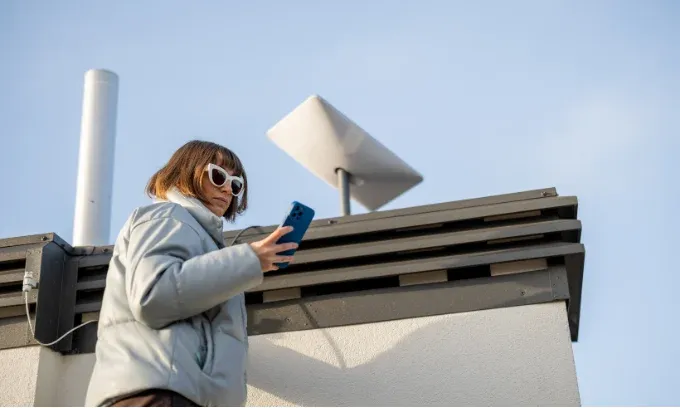
The equipment you’ll need to access Starlink Australia at your home is sent to you, which you then need to set up yourself. For more information on how to install and set up your Starlink connection, you can check Starlink’s website for instructions.
Compared to other broadband providers, Starlink is more of an internet supplier, producing and selling both the access and technology. Because of this, customers are required to do more to set up their service than they would with an NBN connection.
Starlink Australia plans
Previously, Starlink Australia had required residential customers to purchase and install their own equipment for a rather steep upfront cost of hundreds of dollars. However it has now moved to a rental model, where you’ll only pay for your Starlink plan and receive your ‘plug and play’ equipment for $0, although you’ll still need to pay for device shipping.
Although you’ll no longer have to pay the big upfront equipment fees, this also means you’re renting the hardware from Starlink. If you choose to cancel your plan, you’ll need to return your undamaged equipment to Starlink within 30 days — although normal wear and tear is expected — otherwise you may be charged the full retail price of the kit.
Starlink may also charge an additional ‘demand’ surcharge upfront on your purchase. The price of this surcharge will vary based on your location and your plan of choice. This additional fee can cost hundreds of dollars, making Starlink still a rather costly service to purchase despite the removal of the big upfront equipment fee.
How much is Starlink in Australia for residential service?
Residential customers have the choice between three different Starlink internet plans in Australia with different speeds, all with the included rental equipment and unlimited data. The current Starlink cost in Australia is:
- Residential 100Mbps plan: $69 per month, up to 100Mbps capped download speeds
- Residential 200Mbps plan: $99 per month, up to 200Mbps capped download speeds
- Residential Max plan: $139 per month, uncapped speeds, includes free Mini Kit for travel
Source: Starlink. February 2026.
Starlink plans through Telstra
Telstra offers a single Starlink plan for $125 per month, which does not include the upfront equipment cost. You’ll then need to add on your Starlink Standard equipment for $549 upfront, although Telstra sometimes offers a discount on the equipment.
Can I purchase my own Starlink equipment?
If you’d prefer to buy your own Starlink kit than rent, you’ll be able to purchase the equipment outright from retailers including JB Hi-Fi and Harvey Norman. Keep in mind that this won’t include the plan, so you’ll still need to sign up to a Starlink plan via the Starlink website.
Starlink for business
Starlink also offers business services, however these plans cost much more than the residential plans. Business plans are more adjustable with a standard monthly price and the option to then add on additional data blocks if needed, for an additional cost. You’ll also need to add on the equipment for an upfront cost of $549, plus shipping. A pro-level Performance hardware kit is also offered for $2,499 upfront.
The Local Priority plan is designed for fixed and mobile business on land, with monthly prices starting from $108 per month (50GB data) up to $906 per month (2TB data). Add on data blocks start from an additional $42 per month for 50GB.
Starlink’s Global Priority plan is suited for businesses needing global and maritime connections. These plan prices start at $450 per month (50GB data) and go up to $3,870 per month (2TB data). Additional data blocks start at $180 per month for 50GB data.
Starlink speeds in Australia
Although some of Starlink’s residential plans have capped speeds, you’ll find real-world performance can vary. This will depend on the Starlink internet plan you’re on, the hours you use your internet and the coverage in your area.
Starlink states that typical download speeds for its 100 megabits per second (Mbps) plan should be anywhere from 80Mbps-100Mbps. The 200Mbps plan offers 80Mbps-200Mbps download speeds, while the Max plan lists 150Mbps-300Mbps typical download speeds. All three plans have around 20Mbps-40Mbps typical upload speeds and 25ms-60ms (milliseconds) latency.
As for real-world performance, broadband testing and analysis company Ookla has released reports analysing the average performance of Starlink speeds in Australia. Testing done in Q3 and Q4 of 2022, and released in February 2023, saw improvements from the 98.92Mbps average speed in Q3, up to 106.43Mbps on average recorded in Q4.
The Measuring Broadband Australia program run by the Australian Competition and Consumer Commission (ACCC) has also released reports on the performance of satellite services in Australia in December 2025. Starlink recorded peak speeds of approximately 228.8Mbps for downloads, dropping to 197.2 Mbps during busy periods.
Ultimately, the speed range Starlink is predicting is rather wide, and does give some leeway for slower speeds. It’s also a similar speed range to what you can expect with many fixed-line NBN connections.
While you can technically get those super-fast speeds up to 200Mbps, average speeds indicate real-world performance typically sits around 100Mbps to 230Mbps.
Latency on Starlink plans
Latency, sometimes referred to as lag or ping, is the time that it takes for data to go from one point to another. This means that the lower the latency or ping, the quicker the data gets to you.
This is especially important for online gaming, as a lower ping or latency means less lag between when something happens and you react to it — bad lag can mean the difference between winning or losing your game.
Starlink states that it offers ‘low-latency broadband internet’, but satellite internet can typically have higher latency for obvious reasons, as there is greater distance at play. But how does it stack up in the real world?
The same Ookla tests for download and upload speeds recorded an average latency speed of 63ms in the Q3 testing and 66ms in the Q4 testing. Compared to all other providers in Australia combined (which would include fixed wired connections), Ookla reported 15ms and 16ms average latency for Q3 and Q4 respectively.
On top of that, the ACCC’s Measuring Broadband Australia program recorded an average latency of 26.7ms during all hours and 28ms in busy periods.
Keep in mind that fixed wired connections will typically have a lower latency than satellite services. However, compared to the lag you’ll have with other satellite internet, you may experience less lag with Starlink than with comparable internet services.
Starlink Australia coverage
Starlink started in a limited part of the country, but has since expanded to cover virtually all of Australia. You can check the coverage map on the Starlink website to see if Starlink is available to you.
Pros and cons of Starlink plans Australia
Starlink internet has received a lot of hype, thanks to its big promises to deliver faster speeds to regional and remote areas. But is it all it’s cracked up to be?
Pros
- It’s typically faster than what’s currently available on some other satellite internet services
- It’s available virtually Australia-wide
- The cheapest capped-speed plan may be cheaper than some fixed NBN plans with slower speeds.
Cons
- Starlink costs in Australia are high, and if you're not renting the equipment it's expensive to purchase upfront
- More complex equipment will need to be installed by yourself or hire someone to install (ISPs using NBN satellite will typically organise setup for you)
- Higher latency than what you’ll get with fixed-line internet connections, which can be problematic for online gaming.
Are there any alternatives to Starlink Australia?
For Aussies without a fixed-line NBN connection, finding a fast and reliable wireless internet service can be tricky. However, there are a couple of alternatives if Starlink doesn’t seem suitable for your needs.
NBN Sky Muster
The biggest competitor to Starlink in Australia is the NBN, but more specifically, the NBN’s satellite service, Sky Muster. Until Starlink launched in Australia, for many regional and remote Aussies, Sky Muster was their only option to get connected.
NBN Co is seeing Starlink as big competition, as more investment and developments into improving Sky Muster and fixed wireless NBN have rolled out in recent years.
Early 2022 saw NBN Co announce additional funding to improve the service, while in February 2023 was the announcement that NBN Co will trial faster speeds and unmetered data for its satellite customers with a new Sky Muster Plus plan. There are also plans to utilise 5G technology to assist with improved internet services in regional NSW.
However in 2026, NBN Co is expected to start moving services over to Amazon’s own satellite service called Leo (formerly known as Project Kuiper), with Sky Muster to be retired after the roll out is complete.
5G home internet
While NBN satellite services generally aren’t quite yet up to speed with Starlink, another alternative with the capacity to reach similar speeds is 5G home internet.
With 5G network coverage continuing to roll out Australia-wide, more Aussies now have access to this fast home wireless service.
However, as 5G home internet relies on having 5G network coverage at your home, access may still be limited, especially in regional and remote areas. People in metropolitan areas who have been considering Starlink may find 5G home internet a more suitable and affordable option, provided you have good 5G network coverage.
Should I sign up to Starlink Australia?
Starlink certainly talks a big game with its promises of fast satellite internet, and it’s an exciting prospect for many people looking for answers to their technology frustrations.
It’s certainly not a perfect service — and it’s not cheap — but for people living in regional and remote parts of the country, it could be the answer to their internet woes. NBN Co may be lagging behind with its satellite internet services, but it seems that competition from Starlink may have given NBN Co enough of a scare to improve its services.
Starlink has also rolled out a Direct to Cell (DTC) service with Telstra, allowing for satellite-to-mobile messaging in remote areas with no mobile network access. Telstra has also expressed its interest in rolling out data and phone call functions via DTC in the future.
Optus is also collaborating with Starlink to roll out a similar service with text, message and data coverage. However, both services are still being tested in a controlled environment.
Ultimately, if you are living in an area that relies on satellite internet or where a reliable wired connection isn’t available, Starlink could be a good option for your home internet. However, unless you sign up to a plan with rental equipment included, it can carry an expensive upfront and ongoing monthly cost, not to mention that you need to install the equipment yourself, which could be difficult for some customers.
It’s worth comparing Starlink internet, the costs involved and other alternatives that are perhaps available to you (such as Sky Muster NBN and 5G home internet) to see which service will ultimately work best for you.
Can I cancel my Starlink order?
You’re free to cancel your Starlink service at any time via the Starlink Customer portal. If you wish to return your equipment, you’re able to return the undamaged Starlink Kit within 30 days of receipt for any reason and receive a full refund.
To cancel your service, log into your personal account on the Starlink website, navigate to your subscription, and click the ‘Cancel Service’ prompt.
If you cancel after this 30-day period, you won’t receive a refund on your kit (if purchased outright). If you received the rental equipment, you’ll need to return the device to Starlink in good working condition, otherwise you may need to pay off the equipment costs.
Can I take my Starlink with me if I move house?
If you move address but want to take your Starlink Australia service to your new home, you may be able to transfer your service if Starlink is available. However this might not be as simple as switching internet providers with other services like NBN.
To change your service address, log in to your Starlink account and you may be able to change your service address or subscription details. However, changing addresses might not guarantee service at your new address. You may need to reach out to customer support for further assistance.
Why is my Starlink internet so slow?
If you experience slower speeds during peak evening hours (between 6pm and 11pm), it’s possible that network congestion could be slowing your Starlink service. Issues with speed outside of these hours could be to do with your setup.
Check the Starlink app to see if there are any outages or hardware issues, and confirm nothing is blocking the Starlink signal. You can also try unplugging the Starlink router and then plugging it back in.
It’s also important to check the speeds on other devices, as it may be your device and not your Starlink connection that is slow.
Can you watch Netflix and other streaming services on Starlink?
Starlink claims that its fast speeds can handle video streaming, where traditional satellite internet services may have been unable to deliver access to high-definition video streams.
Can you use Starlink internet for gaming?
Starlink claims that online gaming is possible with Starlink’s faster and low-latency connection. However, it’s important to keep in mind that satellite internet — even Starlink — may have higher latency than other internet connections, such as fixed-line connections.