





How does the NBN work?
The National Broadband Network (NBN) uses a range of technologies, including copper wires, cable broadband and optical fibre, to deliver internet connections to Australian homes and businesses.
The combination of NBN technology types used across Australia allows NBN’s fast internet to be beamed into homes in both metro and regional areas. By using wired connections, huge amounts of data can be transmitted across the country through fibre-optic cables.
In order to deliver internet access to your home via the NBN, your home needs to be connected to the network. There are several different NBN connection types that connect homes to the NBN.
What are the NBN connection types?
Each home or business with NBN available will be connected to the network via a certain NBN connection type. Most of the NBN is made up of fibre technology, however additional technologies like satellite and fixed wireless can also be used to deliver connections to homes in more regional or remote areas. There are five fibre-based NBN connection types and two wireless connection types. These are:
- Fibre to the Premises (FTTP)
- Hybrid Fibre Coaxial (HFC)
- Fibre to the Curb (FTTC)
- Fibre to the Node (FTTN)
- Fibre to the Building (FTTB)
- Fixed wireless
- Satellite (Sky Muster)
Why do NBN connection types matter?
You might be wondering why it’s so important to know what your NBN connection type is. Unfortunately, because the NBN is made of a mix of different technologies, it means that not all connections are made equally.
Knowing your NBN connection type is essential to choosing an NBN plan, as your connection type determines what NBN speed tiers are available at your home.
Depending on the connection type you have, you might not have access to the fastest NBN speeds available. For example, an FTTP connection will allow you to take out a plan with higher download speeds than is possible on an FTTN connection.
This is why the Home Fast NBN speed tier is split into two separate speed tiers — NBN 100 (Home Fast I) and NBN 500 (Home Fast II). NBN providers will usually offer both plans at the same price; but if your home has an FTTN/B/C connection type, you’ll only be offered NBN 100 speeds, while FTTP/HFC connections will be offered faster NBN 500.
Sky Muster and fixed wireless plans are also sold and priced differently from fibre and HFC plans, and they’re typically only available in regional and remote areas.
FTTP: Fibre to the Premises NBN
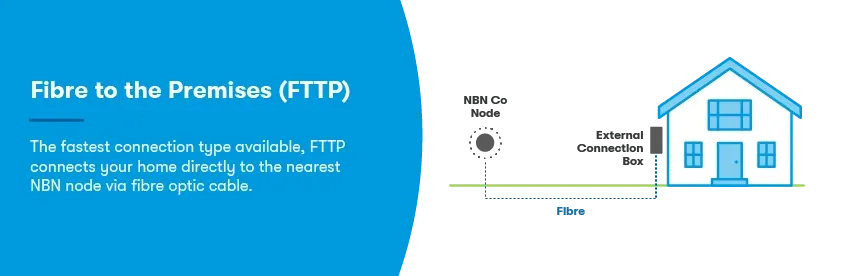
Fibre to the Premises (FTTP) is the fastest of the NBN connection types, originally intended to be rolled out to every property in the country. It involves having a fibre-optic line connected all the way to your home, which allows you to achieve superfast speeds with consistent quality. As more homes are eligible for the NBN’s free fibre upgrade program, FTTP is now the most common NBN connection type in the country.
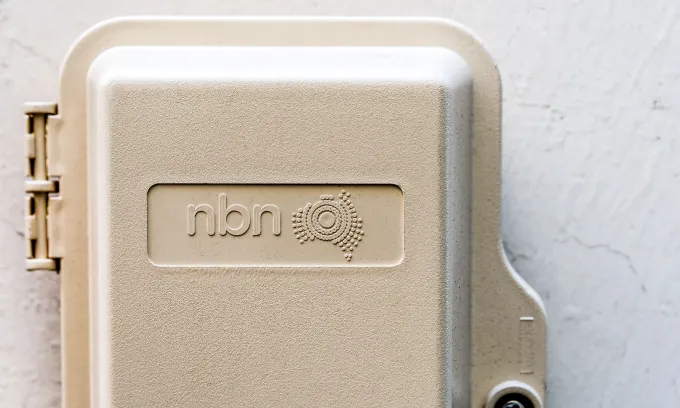
FTTP also involves an NBN access network device to be installed in your home – this includes a small connection box inside your home, and a small utility box on the outside of your property. The device requires power to operate and requires an approved NBN technician to install. It may also be compatible with an NBN battery, which can keep you online during a power outage.
HFC: Hybrid Fibre Coaxial NBN
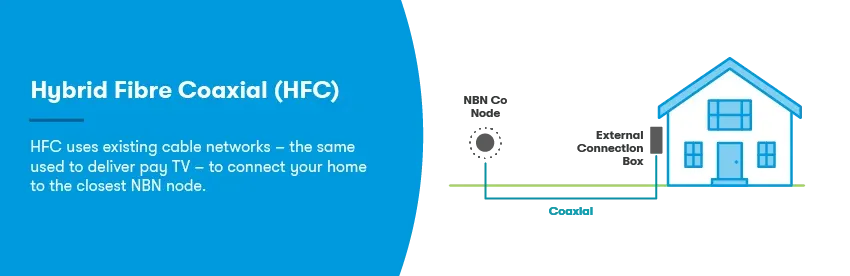
Hybrid Fibre Coaxial (HFC) connections are the same as Fibre to the Node (FTTN) connections, in which existing lines are used to service the NBN connection to a local node, which then services the local neighbourhood.
The difference is that, rather than using the copper wiring used for landline phones, HFC NBN connections utilise already existing pay TV cable network connections to make the final part of the connection. Your bandwidth will be influenced by the other homes using the same node in that neighbourhood.
FTTC: Fibre to the Curb NBN
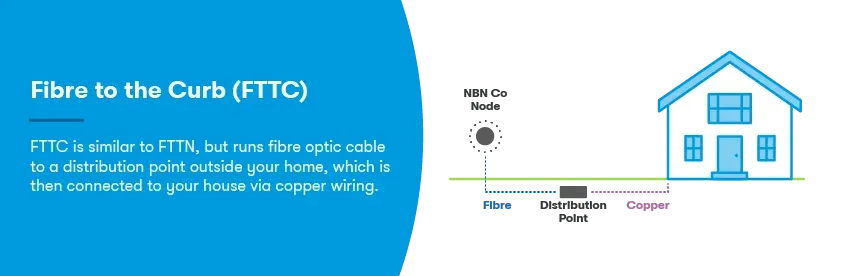
Rather than having a fibre-optic line run out to your home, Fibre to the Curb (FTTC) connections instead run a fibre-optic line to a Small Distribution Point (a DPU) located on the curb of a street, which uses the copper wiring used by existing phone lines to provide internet to nearby houses. This connection isn’t as fast as FTTP and bandwidth is shared with your street, not just your home.
Rather than being connected by a box located in the home, FTTC allows you to access the internet through a telephone wall socket, much like with old ADSL connections. An NBN connection box will also be included with this technology type, but it will be more portable and not require a technician to install.
FTTN: Fibre to the Node NBN
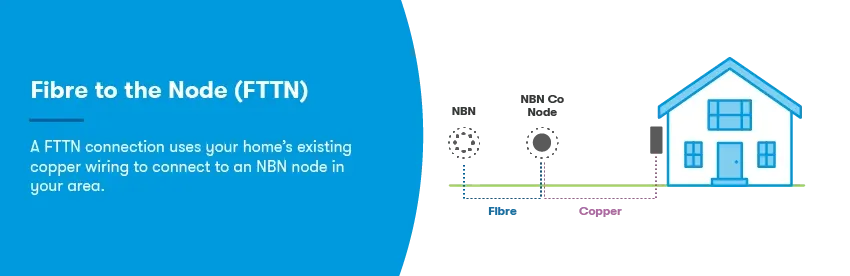
Fibre to the Node (FTTN) is a more cost-efficient form of FTTC, and is one of the most common forms of NBN connection across the country. FTTN uses street cabinets scattered throughout neighbourhoods, which high-speed fibre optic lines are run directly to. From these nodes, existing copper wiring for landline phone networks is run out to houses in the neighbourhood.
Depending on how far you live from the node, your speed will be different — the closer your home is, the faster your connection is. Your bandwidth will be influenced by everybody on the same node connection in the neighbourhood.
FTTB: Fibre to the Building NBN
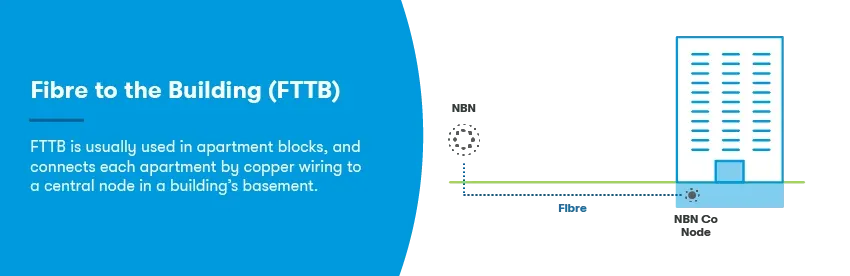
Fibre to the Building (FTTB) connections are very similar to FTTC connections, and are primarily used in apartment blocks or multi-unit dwellings. Fibre optic lines are run directly out to buildings, which are then serviced by already existing technology in the building (such as copper lining or HFC) to get NBN wiring to every apartment on the premises. This means your bandwidth will be influenced by everybody else in the building, as you’re all sharing the fibre-optic lining.
Fixed Wireless NBN
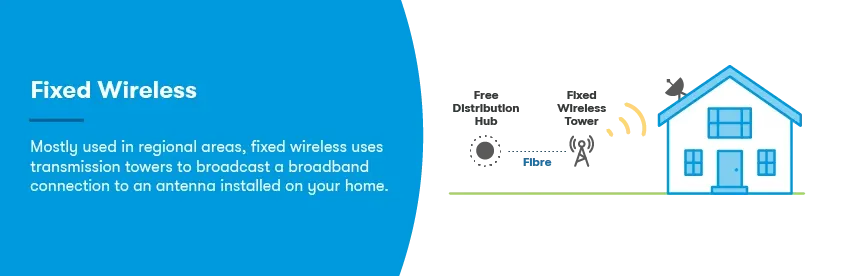
NBN Fixed Wireless uses NBN data transmitted over radio signals to connect a home to the network. Typically this connection type only exists in regional areas. Rather than involving a node, it uses a transmission tower located as far as 14 kilometres away from your property, and an antenna at the property to receive and transmit to the tower.
Fixed wireless connections were once rather slow, with speeds closer to 12Mbps and 25Mbps. Thanks to recent improvements from NBN Co, fixed wireless NBN plans are now offered with new speed tiers up to 200-250/8-20Mbps and 400/10-40Mbps. However, the speeds on offer for fixed wireless NBN plans will differ between providers.
NBN Satellite
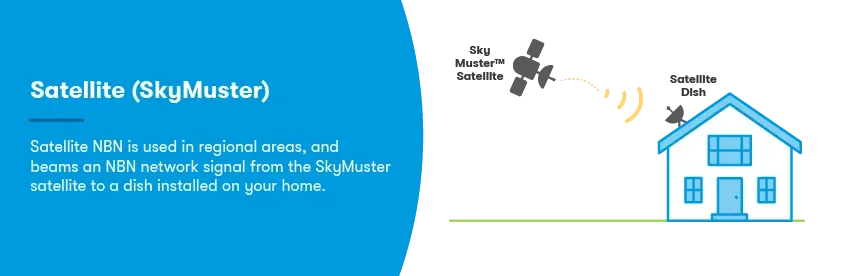
NBN satellite, also known as NBN Sky Muster satellite, services NBN connections in regional areas of Australia, along with islands around Australia’s coast. It requires a satellite dish to be installed on your property, and your internet use is transmitted to the Sky Muster satellite, rather than being through a wired line connection.
While NBN satellite isn’t as fast as fixed-line fibre, customers can access potential download ‘burst’ speeds of up to 100Mbps on the highest tier plans. Your typical and maximum download/upload speeds will depend on the type of Sky Muster plan you choose. Standard Sky Muster plans offer two slower speed tiers (12Mbps and 25Mbps), while the faster and unlimited-data Sky Muster Plus Premium plans come with a choice of three speeds (25Mbps, 50Mbps and 100Mbps).
What is the fastest NBN technology?
The fastest NBN technology type is an FTTP connection, followed by HFC. Both of these connection types are required if you want to sign up with a fast NBN plan on the NBN 500, NBN 750, NBN 1000 or NBN 2000 speed tiers.
While both connection types should be able to achieve the same fast speeds, the NBN 2000 speed tier will have different maximum upload speeds between the two connection types. FTTP connections will be able to get up to 200Mbps upload speeds, while HFC connections will get up to 100Mbps upload speeds.
What NBN connection do I have?
The easiest way to check what NBN connection you have is to run your address through an NBN address checker, such as the NBN Co website or through an NBN provider’s website. This should then tell you what connection type is at your home, and it may also list whether a fibre upgrade is available at your address.
Alternatively, identifying where your NBN connection is in your home could help you find this information yourself. Typically, different types of NBN will have different connection configurations, with FTTP having a box located both inside and outside the house. Other NBN connection types will have boxes (or ‘nodes’) near your home, which can indicate FTTN for larger areas, or FTTC for specific streets. HFC connections will also have this same characteristic. If you’re in an apartment building with a FTTB connection, this will run the connection into your building’s communications room.
In regional areas, you’re likely to have Sky Muster satellite NBN (which requires a satellite dish on your property), or fixed wireless NBN (which puts an antenna on your property).
How much does NBN installation cost?
There is no NBN connection cost for standard connections. If additional wiring or cabling is required, or there is extra equipment needed to connect your premises to the NBN, then this may incur an NBN connection fee.
Other instances when there may be an NBN installation cost include if you move address, need additional equipment for your chosen plan speed, have something wrong with your connection or if the property is new. For newly built or under reconstruction homes, NBN Co may charge a $300 NBN connection fee, so that the property can be connected to the network.
However, some homes already connected to the NBN with a FTTN or FTTC connection may be eligible for a free fibre upgrade. While this upgrade is typically free for eligible homes — excluding the cost of the fast-speed NBN plan that you’ll need to sign up to in order to trigger the upgrade — some more complex installations may incur additional costs that your NBN provider may choose to charge you.
What is the NBN connection box?
Connecting your home to the NBN generally involves the installation and use of both internal and external equipment, which is supplied and maintained by NBN Co. One of the key pieces of equipment is called an ‘NBN connection box’, ‘NBN box’ or ‘NBN Network Termination Device’ (NTD), and it connects your modem/router to the NBN.
Not all NBN connection types require a connection box, and the kind of boxes used will also vary between technologies. However, all NBN boxes require power and will be either fixed to a wall inside your home, or be a standalone device you can plug in to a power outlet.
Where is my NBN connection box?
No matter your technology type, the NBN connection box is typically installed or placed near an existing wall telephone jack or cable outlet in your home. It should also be in reach of a power outlet, as all NBN boxes require electricity.
Your home’s telephone or cable outlet can then connect your NBN box to an external utility box, which is usually installed outside of your home. If you have an FTTP connection and opt for a power supply unit with battery backup — also known as an NBN battery — you’ll have two boxes installed inside.
If you’ve moved to a new address that requires a connection box, you should find an NBN-branded piece of equipment inside, either installed or placed by a telephone outlet. What this box looks like will depend on your connection type, but most fibre NBN types will use a square white or grey box. HFC connection boxes are usually rectangular and black.
If you’re moving to a newly-built property, or one that’s never had an NBN connection, the NBN connection box will be supplied and/or installed by NBN Co when you sign up for an NBN plan.
Do I need to take any NBN equipment with me if I move home?
If you’re moving to a new address, the only equipment you’ll need to take with you is your own modem/router. The NBN connection box and any other NBN installed equipment, especially equipment fixed to the wall and building, is property of NBN Co and needs to remain at the address it’s been installed at.
Your new address might also have a different NBN connection type, so there may be different equipment at your new home.
What if there’s no NBN connection box at my new house?
If you’ve arrived at a new address but your NBN connection box is missing, you’ll need to let your NBN provider know. They can then arrange with NBN Co to replace any missing equipment, as well as organise a time for a technician to come by and re-install it if needed.
What is an NBN battery?
Also called an NBN Power Supply Unit, an NBN battery is an optional power or battery pack that is designed to keep your connection online in the event of an electricity disruption or blackout. As NBN connections aren’t able to work in a power outage, having a battery back-up available can be useful, especially in emergencies.
An FTTP connection is the only NBN type that comes with the ability to install a backup power unit. Homes with FTTP require an NBN connection box installed inside, which your devices can then connect to. The FTTP connection box is powered by connecting to an electrical outlet in your home: however, you can also connect it to a second standalone power supply, which serves as a battery backup if your home’s power cuts out.
Customers on FTTP plans aren’t required to use an NBN battery. But if you’re in an area prone to blackouts, a back-up battery could be a worthwhile purchase, as it provides about five hours of extra power during an outage.
How do I tell if my NBN battery needs replacing?
Fortunately, NBN batteries are designed to notify you when it’s time for a replacement. The first sign you may notice is a red light next to the ‘Replace Battery’ indicator on your NBN connection box, followed by a beep or alarm tone.
- One beep every 15 minutes indicates the battery needs replacing
- Four beeps every minute indicates less than half of the battery charge remains.
Once you’re aware that your battery is ready to be replaced, you can temporarily switch off the beeps coming from your connection box. Simply press and hold the ‘Alarm Silence’ button for up to three seconds: this should silence it for 24 hours. To silence it indefinitely until you’re able to replace your battery, press and hold ‘Alarm Silence’ for 15 seconds.
NBN batteries are quite easy to come by, and can be purchased at many mainstream battery retailers across Australia. Note that some stores may require a special order, so you may want to call ahead and explain your needs. Old NBN batteries are considered hazardous waste, so they should be safely recycled at a battery recycling location (such Battery World or Bunnings), rather than thrown into landfill.
NBN connection check
If you think there’s an NBN outage or your NBN connection seems a bit patchy, there’s a couple ways you can perform an NBN connection check.
The easiest way to check your connection is to look at your modem/router. Check that the lights on your modem are on (they may be flashing), especially any light that may be labelled as ‘internet’. If the lights are off, try turning your modem off, unplugging from the power point, waiting up to one minute, then plugging it back in and turning it back on. It may take a couple of minutes for your modem to fully restart.
If after a few minutes your connection is still not back, you may want to further investigate if there are any NBN outages or other issues, but keep in mind you’ll need to use your mobile phone’s data to get online to check!
You can also check your NBN connection box (if you have one) to see if the lights are on. Some boxes may have different coloured lights depending on the network status, but this will differ between NBN connection types.
Alternatively, some NBN providers offer NBN connection check and diagnostic tools through their app or account portal. If you have access to this service, log in to your app or account. Otherwise you may need to reach out to your provider for help.